
A business website is often one of the first places potential customers visit before deciding whether to trust a company. They want to understand what the business offers, whether it can solve their problem and how they can get in touch. If the website makes those answers difficult to find, even a capable business can lose an opportunity. What Could be the essential features of a Business Website could be ?
Good website design addresses these needs by combining visual appeal, clear communication, usability and functionality. A professional website should explain your services, demonstrate credibility, work smoothly on mobile devices and guide visitors towards a meaningful action, such as making an enquiry, booking a consultation or purchasing a product.
However, every business does not need the same website. A creative agency may need a strong portfolio and case studies, while a local service provider may prioritise contact details and enquiry forms. An online retailer, meanwhile, needs a reliable shopping and payment experience.
Here are ten essential features of a businesses website should consider when planning a professional website.
1. A Clear Homepage That Explains Your Business
Your homepage should answer three basic questions quickly: What does your business do? Who does it serve? Why should someone choose it?
A visitor should not have to navigate several pages to understand your main offering. Start with a clear headline, a short explanation of your services and a prominent call to action.
For example, a creative agency could use a headline such as “Creative Campaigns, Films and Digital Experiences for Growing Brands.” This communicates the agency’s work more clearly than a vague statement about delivering excellence.
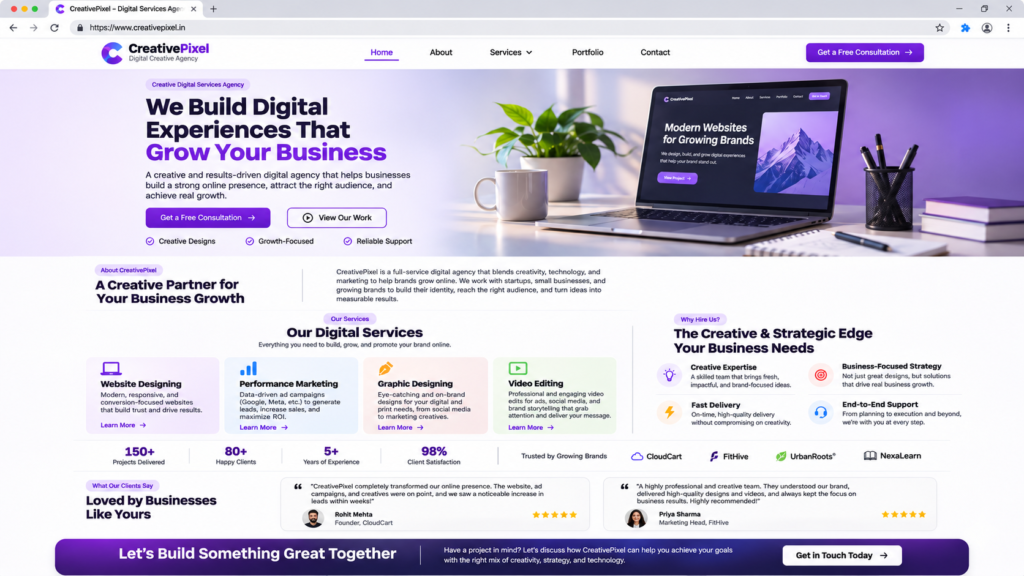
A strong homepage generally includes:
- A clear headline and supporting description.
- A short introduction to the business.
- An overview of the main services or products.
- Selected projects, customer testimonials or other trust signals.
- A visible call to action, such as “Request a Quote” or “View Our Work”.
- Simple navigation to the most important pages.
Avoid filling the homepage with every detail about the company. Its job is to establish context and help visitors find the information they need.
2. Mobile-Friendly and Responsive Design
A professional website must work across smartphones, tablets and desktop computers. Visitors should be able to read the content, navigate the menu, view images and complete forms without constantly zooming or scrolling sideways.
Responsive web design allows a website’s layout to adapt to different screen sizes. Text, images, navigation and interactive elements should remain usable regardless of the device.
Mobile usability is also relevant to search visibility. Google primarily uses the mobile version of a website’s content for indexing, making a complete and usable mobile experience an important consideration.
When reviewing a website on mobile, check that:
- Text remains readable without zooming.
- Buttons are easy to tap.
- Navigation menus work correctly.
- Images fit the screen without breaking the layout.
- Contact forms are simple to complete.
- Important information is not hidden behind unnecessary interactions.
A design that looks impressive on a large monitor but becomes difficult to use on a phone is not a complete business website.
3. Dedicated Service or Product Pages
Your homepage introduces your business, but dedicated pages explain what you actually offer.
If a company provides several services, placing them all in one paragraph makes it harder for visitors to understand the differences. Separate pages allow each service to have its own explanation, benefits, examples and enquiry option.
For instance, a digital agency might create individual pages for:
- Digital Marketing
- Content Marketing
- Social Media Marketing
- Website Designing and Development
- Video Production
- Search Engine Optimisation
Each page should explain the service, who it is suitable for, what the customer can expect and how to enquire. Relevant examples, deliverables and answers to common questions can make these pages more useful.
Dedicated pages can also help search engines understand the subjects a business covers. Google recommends creating useful, descriptive content and organising information so that people and search engines can understand it.
Do not create dozens of nearly identical service pages simply to target different keywords. Every page should offer a distinct reason to exist.
How Much Does It Cost to Design a Website?
The cost of website designing depends on the features, functionality and level of customisation a business requires. A simple business website has different requirements from a fully functional e-commerce platform or a custom website with advanced integrations.
Website development quotes vary substantially by scope, provider and technical requirements. Rather than assuming a universal price range, compare itemised proposals covering design, development, content, integrations, testing and support. If you publish a local pricing estimate, explain which projects and quotations it is based on.
Several factors influence the final cost:
- Number of pages: Larger websites require more design, content and development work.
- Custom design: Bespoke layouts and interactive experiences can require additional time and expertise.
- E-commerce functionality: Product catalogues, shopping carts, checkout systems and payment integrations add complexity.
- Content and media: Copywriting, photography, video production and content migration can affect the budget.
- Third-party integrations: Booking systems, CRM tools, payment gateways and other integrations may increase development costs.
- SEO and performance setup: Technical configuration, tracking, optimisation and testing need to be considered within the project scope.
- Maintenance and support: Ongoing updates, hosting, security monitoring and future improvements may involve separate recurring costs.
Before starting a project, ask for a clear breakdown of the initial development cost, included features, third-party charges and ongoing maintenance expenses.
The most suitable website is not necessarily the cheapest or the most expensive. It is the one that meets your business requirements, provides a good user experience and supports your objectives within your budget.
4. A Strong Portfolio Website or Case Studies
For businesses that sell expertise, creativity or specialised services, a portfolio can be more persuasive than a long list of claims.
A well-organised Portfolio Website helps potential customers evaluate the quality of your work before making contact. This is particularly useful for creative agencies, photographers, architects, designers, filmmakers and marketing companies.
Real-World Website Examples: What Performance Reports Reveal
A portfolio is more useful when it shows how a website performs, not only how it looks. The following examples draw on website performance reports prepared in November 2026. They demonstrate different business priorities and the importance of interpreting data carefully. These are measured snapshots, not before-and-after claims or proof that any particular design change caused the figures.
Example 1: Blue Orange Experiences — A Service-Based Creative Website
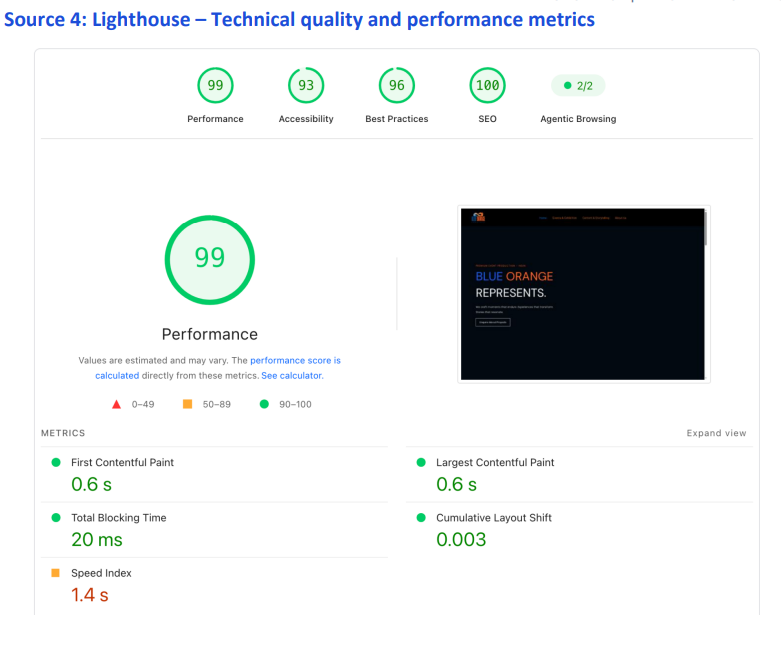
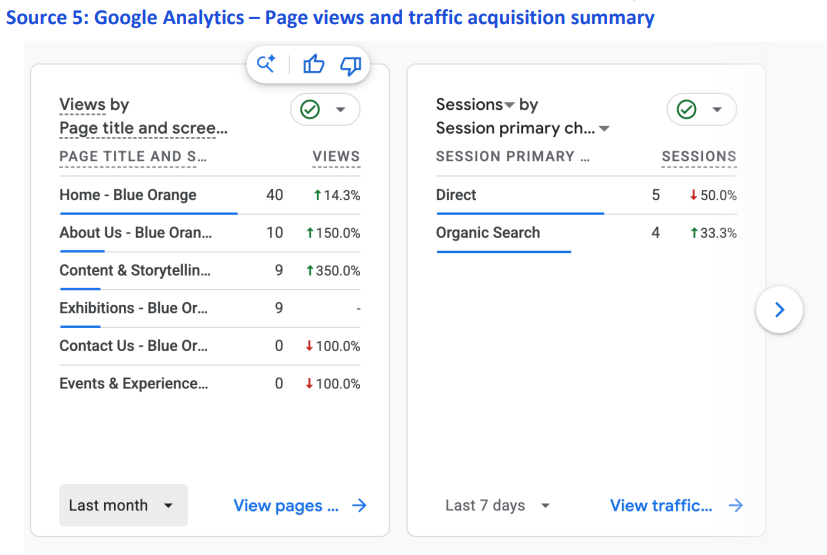
Blue Orange Experiences illustrates a service-led website where visitors need to understand the agency’s capabilities, explore its work and find an enquiry route. A website performance report prepared on 4 November 2026 recorded the following results:
| Measurement | Reported result |
| Lighthouse Performance | 99/100 |
| Lighthouse Accessibility | 93/100 |
| Lighthouse Best Practices | 96/100 |
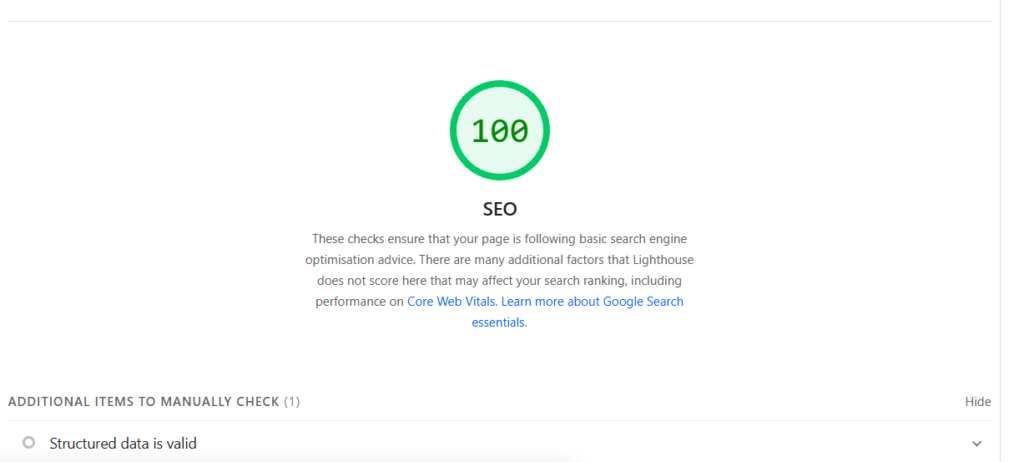
| Lighthouse SEO audit | 100/100 |
| Largest Contentful Paint, in the reported lab test | 0.6 seconds |
| Google Search clicks, 5 October–1 November 2026 | 4 |
| Google Search impressions, same 28 days | 65 |
| Average Google Search CTR, same 28 days | 6.2% |
The site had a strong technical test result, but its search visibility was still at an early stage. The report also recorded 40 homepage views, 10 About Us views, 9 Content & Storytelling views and 9 Exhibitions views in its separate “last month” analytics snapshot. These page-view figures should not be compared directly with the 28-day Search Console data.
Practical lesson: Technical performance creates a helpful foundation, but a creative business also needs detailed service explanations, genuine project evidence, effective internal links and measurable enquiry actions. A 100/100 Lighthouse SEO score does not mean a website ranks first in Google.
Example 2: Fillme Networks — A Creative Agency and Production Services Website
Fillme Networks shows how a service-oriented creative agency website can be evaluated through a combination of technical testing, organic search data and audience engagement. Its website performance and SEO report, prepared 3 November 2026, recorded:
| Measurement | Reported result |
| Lighthouse Performance | 96/100 |
| Lighthouse Accessibility | 91/100 |
| Lighthouse Best Practices | 96/100 |
| Lighthouse SEO audit | 100/100 |
| Largest Contentful Paint, desktop lab test | 1.1 seconds |
| Google Search clicks, 4–31 October 2026 | 71 |
| Google Search impressions, same period | approximately 1,050 |
| Average Google Search CTR, same period | 6.8% |
| Average position, same period | 4.6 |
The report’s separate year-to-date GA4 view showed approximately 1,200 active users and 2,000 page views, with 20 seconds of average engagement time per active user. Its most-viewed pages included the homepage (959 views), Creative Agency (345) and Video Production (313). The Search Console indexing snapshot listed 8 indexed pages, while the visible index-count trend had declined; that calls for investigation rather than a claim of complete indexing coverage.
Practical lesson: Relevant service pages can attract meaningful attention, but search visibility should be reviewed beyond branded queries. Strong performance tests do not replace clear messaging, useful portfolio evidence, accessible contact options or conversion tracking. The Lighthouse results were from a single desktop-emulated test, not a measurement of every visitor or page.
Evidence: Fillme Networks Website Performance & SEO Report, prepared 3 November 2026, sections 2–6. The report was compiled from supplied Search Console, GA4 and Lighthouse screenshots.
Example 3: Lal Behari Tandon (LBT) — An E-commerce Website I Created
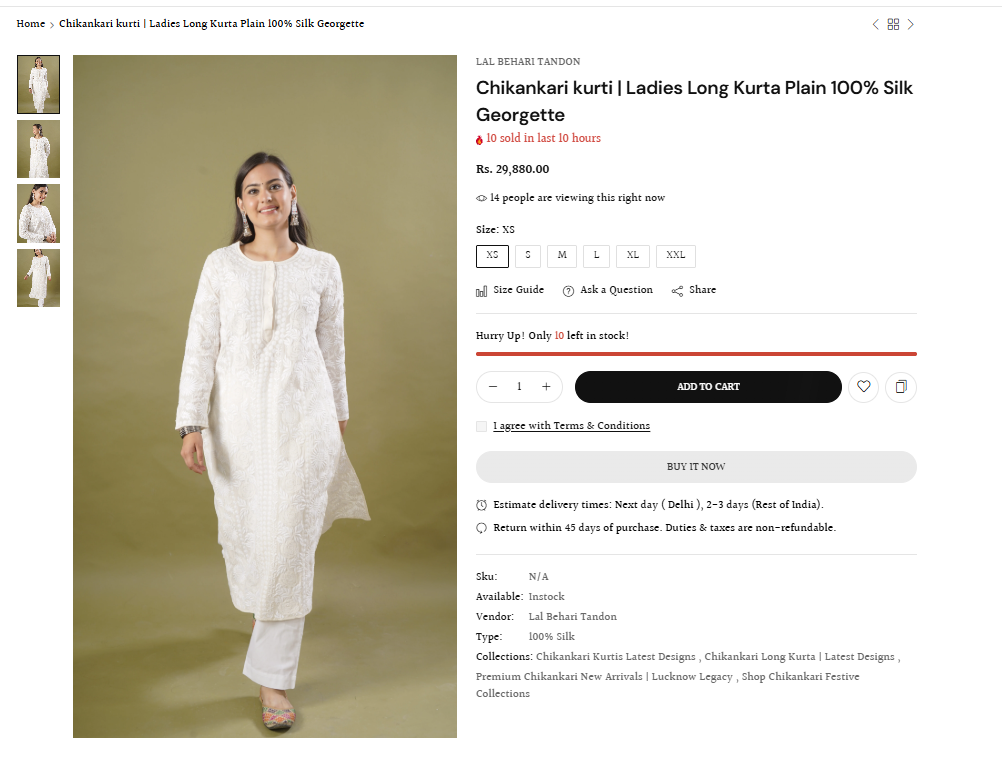
I created the e-commerce website for Lal Behari Tandon (LBT), a clothing brand. The project provides a practical example of how website design must account for more than appearance: shoppers need to discover collections, view products and complete purchases without unnecessary friction.
A Google PageSpeed Insights desktop Lighthouse screenshot dated 23 November 2026 provides the following measured snapshot of the website:
| Measurement | Observed result |
| Lighthouse Performance | 61/100 |
| Lighthouse Accessibility | 95/100 |
| Lighthouse Best Practices | 100/100 |
| Lighthouse SEO audit | 92/100 |
| First Contentful Paint (FCP) | 0.3 seconds |
| Largest Contentful Paint (LCP) | 1.1 seconds |
| Total Blocking Time (TBT) | 850 milliseconds |
| Cumulative Layout Shift (CLS) | 0.003 |
| Speed Index | 6.1 seconds |
The audit shows two different sides of the site’s technical experience. First Contentful Paint and Largest Contentful Paint are fast in this laboratory run, and layout stability is strong. At the same time, 850 ms of Total Blocking Time and a 6.1-second Speed Index identify opportunities to improve responsiveness and how quickly the page looks complete. The screenshot also shows a newsletter sign-up overlay and a cookie notice, which are useful elements to review for their impact on usability and the measured experience; the screenshot alone does not establish whether they caused the blocking time.
For an e-commerce website, the next performance review should check scripts, third-party integrations, pop-ups and the shopping flow, while separately testing mobile pages and real-user experience. The 61/100 desktop Performance score is a current audit result, not a before-and-after improvement, and the screenshot does not provide evidence of conversion-rate or sales growth.
Practical lesson from my LBT website project: A well-designed online store needs attractive product presentation, accessible navigation, secure and straightforward checkout, and continuing performance testing. Strong accessibility and best-practices scores are encouraging, but a developer should also identify and address remaining responsiveness issues rather than treating any single Lighthouse result as proof of overall success.
What these three examples show: Website success depends on business goals. For service providers, evaluate discoverability, clear service information, enquiry paths and qualified leads. For online stores, also evaluate product discovery, interactive responsiveness and checkout completion. In every case, use dated measurements, distinguish laboratory tests from real-user data, and explain what the evidence can—and cannot—prove.
5. About Us, Team and Trust Signals
Customers often want to know who is behind a business before they commit their money or share their information.
An About Us page should explain the company’s background, expertise, approach and values in a straightforward way. Depending on the business, it may also introduce the team, founders or key professionals.
Useful trust signals include:
- A genuine business address or service area, where relevant.
- Accurate contact details.
- Real team photographs and professional biographies.
- Verified client testimonials and reviews.
- Relevant qualifications, memberships or certifications.
- Case studies and examples of completed work.
- Clear privacy, refund or service policies where applicable.
Trust signals must be genuine. A large collection of vague testimonials or unverified client logos can create doubt instead of confidence.
For Indian businesses, clear phone, email and WhatsApp contact options may also make it easier for prospective customers to start a conversation. Choose the channels your team can reliably manage.
The aim is to help visitors understand that there is a real business, with identifiable services and a credible way to communicate.
6. Fast Loading Speed and Smooth Performance
Visitors should not have to wait unnecessarily for a website to become usable. Slow-loading pages, oversized images, broken layouts and unresponsive buttons can interrupt the experience and make it harder to complete an enquiry or purchase.
Website performance depends on several factors, including image sizes, hosting, code, third-party scripts and the way the site loads its content.
A practical performance checklist includes:
- Compress images and use suitable modern image formats.
- Avoid autoplaying large videos unless they serve a clear purpose.
- Remove unnecessary plugins, scripts and animations.
- Use reliable hosting appropriate to the site’s traffic and functionality.
- Test key pages on mobile devices and slower connections.
- Monitor performance using Google PageSpeed Insights and relevant Core Web Vitals reports.
Performance should be assessed alongside usability, accessibility and the quality of the content. A fast website is valuable, but speed alone cannot compensate for confusing navigation or an unclear offer.
Test important pages individually rather than assuming that a good homepage score means the entire website performs well. For example, the November 2026 reports for Blue Orange and Fillme Networks recorded Lighthouse Performance scores of 99 and 96, respectively, for their supplied tests. Those are strong lab snapshots, but they are not proof of real-user Core Web Vitals or before-and-after improvements. The separate Lal Behari Tandon desktop audit illustrates why individual diagnostics matter: its LCP was 1.1 seconds, while its 850 ms Total Blocking Time contributed to a less favourable overall performance picture.
7. Search Engine Optimisation and Website Structure
A professional website should be designed so that potential customers can discover it through relevant searches. This requires more than inserting keywords into headings.
Search engine optimisation should be considered during planning, content creation and development.
Important elements include:
- Descriptive page titles: Explain the subject of each page.
- Logical headings: Organise information into clear sections.
- Readable URLs: Use short, meaningful addresses.
- Useful page content: Answer the questions your intended customers actually have.
- Internal links: Connect related service pages, case studies and resources.
- Image optimisation: Use suitable image sizes and descriptive alternative text when appropriate.
- Technical accessibility to search engines: Ensure important pages can be crawled and indexed.
- XML sitemap and indexing checks: Help manage discovery and monitor which pages are indexed.
For example, a business serving Delhi may create a dedicated service page that explains its offering, service area, relevant projects and enquiry process. It should only target Delhi if the business genuinely serves that market.
Avoid repeating the same keyword unnaturally across every heading. A website should make sense to customers first, while helping search engines understand its content and purpose.
SEO is an ongoing process. A new website does not automatically rank well simply because it has been designed professionally.
8. Content Marketing and Helpful Resources
A website should not rely entirely on its service pages to attract and inform visitors. Depending on the business, useful articles, guides, videos and downloadable resources can answer customer questions before a sales conversation begins.
This is where Content Marketing can support a wider digital strategy.
For example, a web design company might publish articles about website maintenance, common design mistakes, choosing a content management system or preparing a website brief. A financial consultancy could explain relevant financial concepts, while an architecture firm might showcase design approaches and project considerations.
Useful website content can:
- Answer common customer questions.
- Demonstrate subject knowledge.
- Support organic search visibility.
- Give visitors a reason to return.
- Provide material for social media and email campaigns.
- Help prospective customers understand a service before enquiring.
Create content around genuine customer needs rather than publishing articles simply to increase the number of pages on the website.
Every resource should have a clear purpose, accurate information and a logical connection to the business. Keep important service information updated, and make it easy for readers to move from an informative article to a relevant service page.
9. Clear Calls to Action and Contact Options
A visitor may understand your services and like your work but still leave if the next step is unclear.
Calls to action guide visitors towards the actions that matter to the business. The right action depends on what the business sells and how customers make decisions.
Examples include:
- “Request a Quote” for service providers.
- “Book a Consultation” for professional advisers.
- “View Our Portfolio” for creative businesses.
- “Add to Cart” for online stores.
- “Download the Brochure” for businesses offering detailed product information.
Place calls to action where they are relevant, such as after a service explanation, below a case study or alongside pricing information. Use specific language rather than vague buttons such as “Click Here”.
Contact forms should request only the information needed to respond. A simple form might ask for a name, email address, service requirement and short message.
Also provide alternative contact options when appropriate, such as a business email address, telephone number or WhatsApp link. Make sure these channels are monitored and that forms send enquiries to the correct destination.
For service businesses, tracking form submissions, calls and qualified enquiries can help establish whether the website is contributing to business goals.
10. E-commerce Website Designing, Security and Accessibility
Some websites primarily generate enquiries. Others need to handle transactions, customer accounts and sensitive information. These differences should influence the design and technical requirements from the beginning.
What an e-commerce website needs
Effective E-commerce Website Designing must make it easy for shoppers to discover products, understand their options and complete an order.
Essential features often include:
- Clear product categories and navigation.
- High-quality product images and accurate descriptions.
- Pricing, stock information and available product variations.
- Search and filtering where the catalogue requires them.
- A shopping cart and straightforward checkout.
- Secure payment integration.
- Transparent shipping, delivery, return and refund policies.
- Order confirmation and customer support information.
For an Indian online store, the checkout experience should clearly communicate the final price, applicable delivery charges, delivery expectations and available payment methods. Offer only the payment methods the business can actually support.
Product pages should provide enough detail for customers to make an informed choice. Hidden charges, confusing forms and unexpected checkout steps can undermine confidence at the point of purchase.
Security and privacy
A business website should use HTTPS, keep its software and plugins updated, restrict administrative access appropriately and maintain reliable backups.
Forms and payment-related functionality need particular care. Use reputable payment providers and follow the security requirements that apply to the business. Publish a clear privacy policy explaining relevant data collection and use, and assess applicable Indian data protection and consumer requirements before launch.
Accessibility
People should be able to navigate and understand a website using different devices and assistive technologies. Use readable text, sufficient colour contrast, descriptive form labels, meaningful alternative text for informative images and keyboard-accessible navigation.
Accessibility should be part of the design and testing process, not an afterthought.
Plan a Essential Features of a Business Website
Before starting development, identify the main job your website needs to perform. A useful planning process begins with five questions:
- Who is the website for? Define your intended customers and their most common needs.
- What should visitors do? Decide whether the priority is enquiries, bookings, purchases, portfolio views or another measurable action.
- Which pages are essential? Start with the homepage, relevant service or product pages, About Us and Contact pages. Add case studies, a blog or other sections when they provide genuine value.
- What content and functionality are required? Prepare the copy, original images, project examples, forms, integrations and policies before launch.
- How will success be measured? Monitor relevant indicators such as qualified enquiries, conversion rate, completed purchases, page performance and organic search traffic.
A smaller website with clear messaging and reliable functionality can serve a business better than a much larger website filled with unnecessary sections.
Final Thoughts
Professional Website Designing is about creating a useful experience that connects a business with its customers. Strong visuals establish an impression, but clear messaging, responsive layouts, useful content, trustworthy information and straightforward navigation help turn that impression into action.
The right combination of features depends on the business. A service provider may need detailed service pages and case studies, while an online retailer needs a reliable product catalogue and checkout. Digital Marketing and Content Marketing can then help attract relevant visitors and guide them towards the next step.
Plan the website around your customers, build the essential features properly and measure how well it supports your business objectives. That is a more useful starting point than choosing a design purely because it looks impressive.
